ML Playgrounds: A Dark Theme for Streamlit Without a Restart, and a Mistake the Highlighting Found
A theme switch on every page of the site that repaints the Streamlit playgrounds without restarting Python; an explanation of the data on the data-leakage playground, where highlighting the real features exposed a mistake in the documentation; the diabetes features explained; and a speed measurement that reported “×inf faster” because the browser coarsens its clock.
After the second course’s playgrounds — “Foundations of Programming AI Systems in Python” — four changes followed. Two add explanations, one fixes a measurement that gave infinity in the browser, and one concerns the whole site.
A dark theme without restarting Python
A theme button now sits in the top right corner of the catalogs and the playgrounds. The choice is shared across the site and kept in the browser; until a reader picks one, the system theme applies.
The difficulty was the playgrounds. They run on stlite — Streamlit running in the browser through Pyodide — and Streamlit picks its theme itself, from the system’s prefers-color-scheme setting. Restarting Python to change the theme is slow: the first load of a page downloads the runtime and takes up to a minute. The answer is to reply to Streamlit’s own query: the switch replaces the answer to prefers-color-scheme with the reader’s choice, and the playground repaints itself.
The templates’ colours are now keyed to the data-theme attribute rather than to the system theme. Tests check that the switch snippet is on every page and comes before stlite loads. It was checked at 375 pixels too: none of the 13 playgrounds scrolls sideways, and the charts fit the screen.
Data leakage: what the data are and what got selected
The data-leakage playground shows how selecting features before splitting the sample finds a pattern in pure noise. It used to start straight with numbers. Now a “Data and task” block comes first: what the table is, what is predicted, what the signal is and where exactly the leak happens.
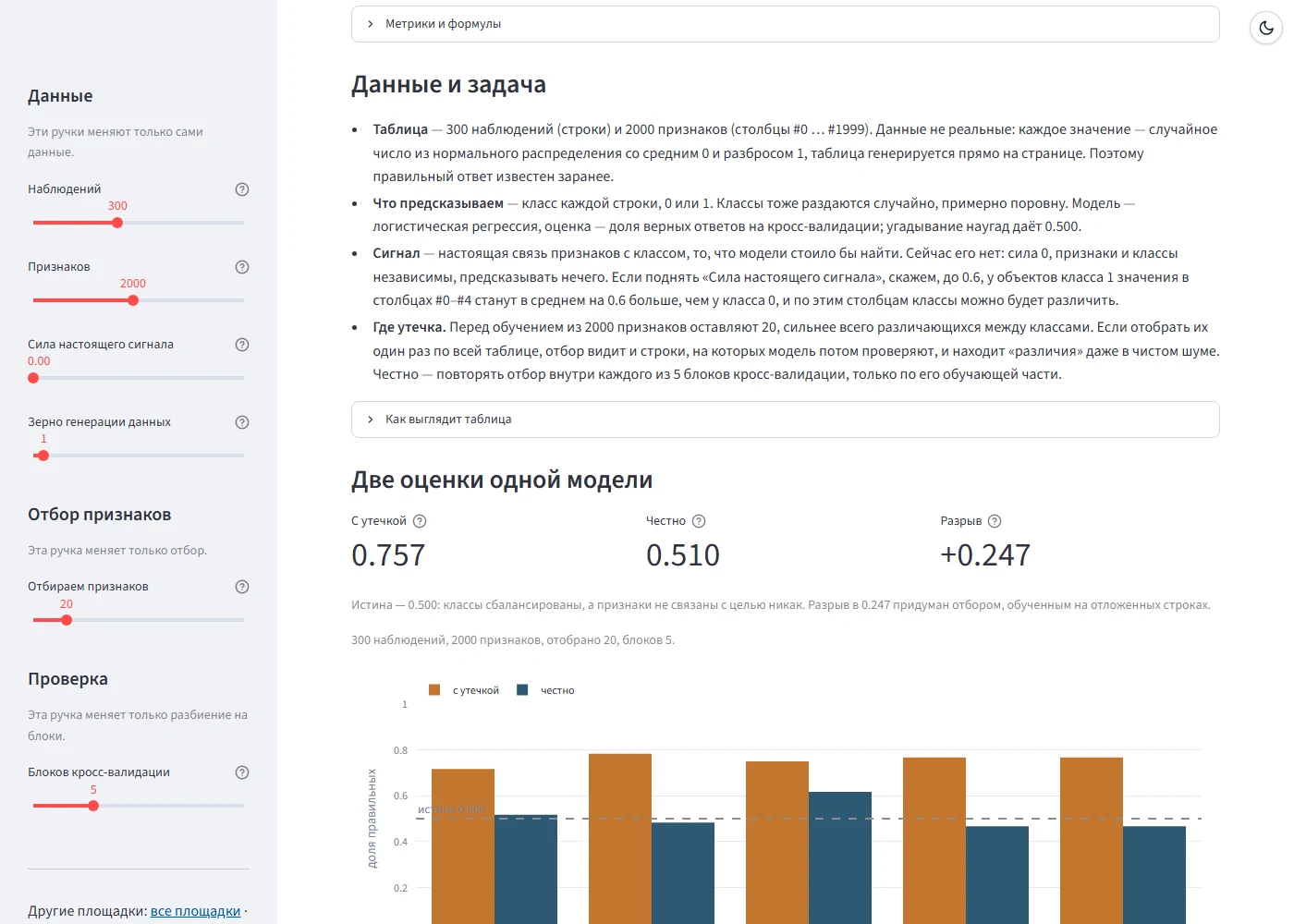
The table is 300 rows and 2,000 columns of random numbers, and the classes are assigned at random as well, so the honest answer is known in advance: 0.5. The “strength of the real signal” slider shifts the mean of class 1 in columns #0–#4, and then there is something to predict.
The “What exactly got selected” section now explains its chart. Selection on the whole table picked 20 columns; then it is repeated five times, as in the honest branch — each time on the training part of one fold only. A bar’s height is how many folds selected the feature again. The real features are highlighted in colour.
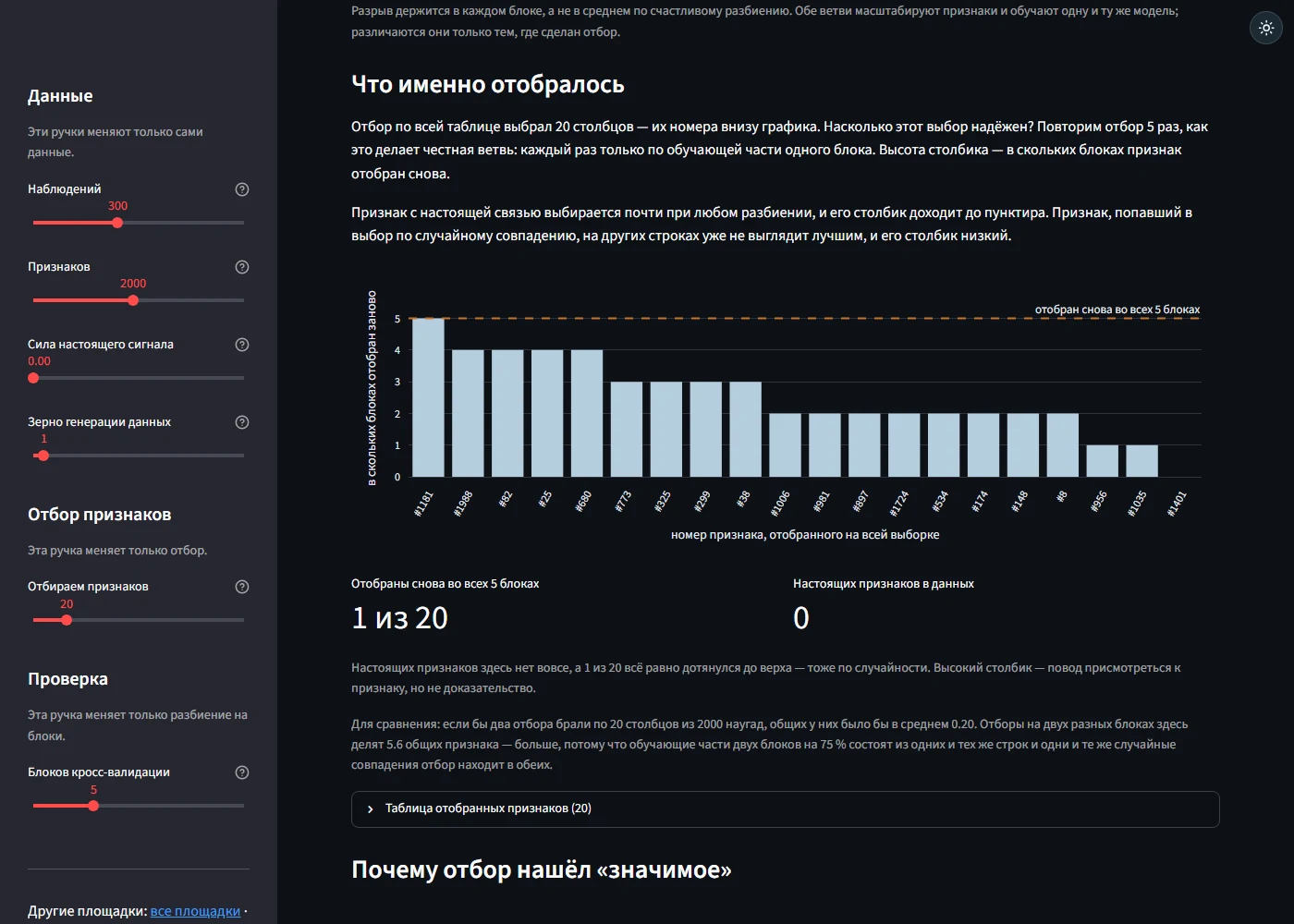
The highlighting at once found a mistake in the course documentation. It said that at a signal strength of 0.6 five features would reach the top, and that they would be exactly the five columns holding the signal. In fact one of the five is noise, #1181, while the real feature #0 is selected again in only four folds out of five; all five real features reach the top only at 0.8 — and the same #1181 along with them. The documentation has been corrected: a bar’s height is a hint, not proof. The same #1181 shows in the screenshot: with zero signal it alone reaches the top — by pure chance.
Model complexity: what the diabetes features mean
On the model-complexity playground the “Penalty” tab shows how Ridge and Lasso shrink the weights of the ten features of the diabetes dataset. Under the weights chart there is now a “What the features mean” block: what each column measures, the Ridge and Lasso weights at the chosen penalty strength, and how to read the weight of a standardised feature.
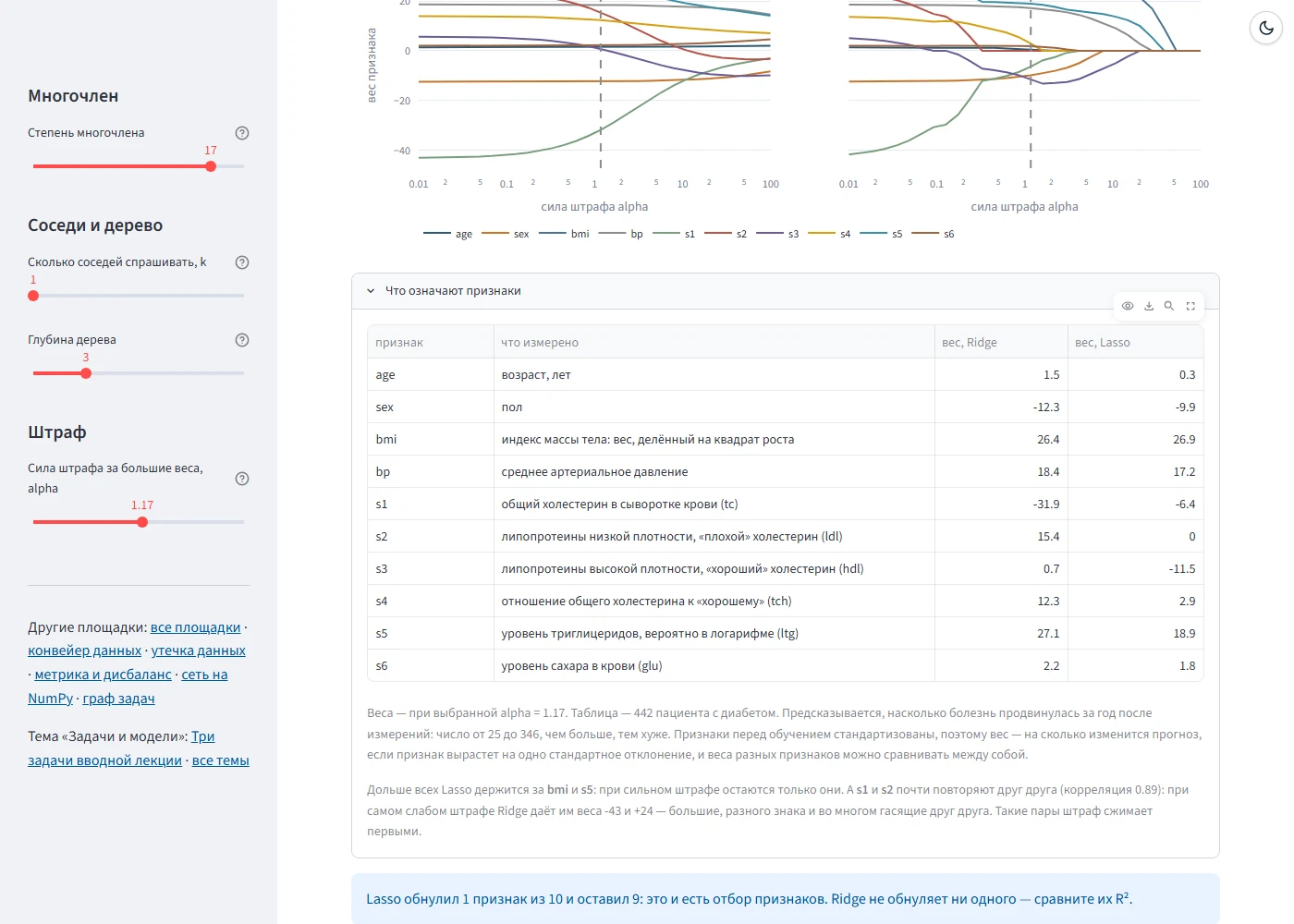
What is predicted is how far the disease progressed in the year after the measurements — a number from 25 to 346. The features are standardised before training, so a weight is how much the prediction changes when the feature grows by one standard deviation, and weights of different features can be compared with each other.
Two conclusions in the block are not written as text but computed from the data: which features Lasso keeps longest (here bmi and s5) and which pair nearly repeat each other. That is s1 and s2 — total cholesterol and “bad” cholesterol, with a correlation of 0.89. At the weakest penalty Ridge gives them weights of −43 and +24 — large, of opposite sign and largely cancelling each other out. A penalty shrinks such pairs first.
A speed measurement and a coarsened clock
On the data-preparation playground the “Vectorisation and memory” tab compares three ways of computing a sum of squares: a Python generator and two ways in NumPy. The measurement runs right in the browser, and for small sizes it showed “0.0 ms” and “×inf faster”.
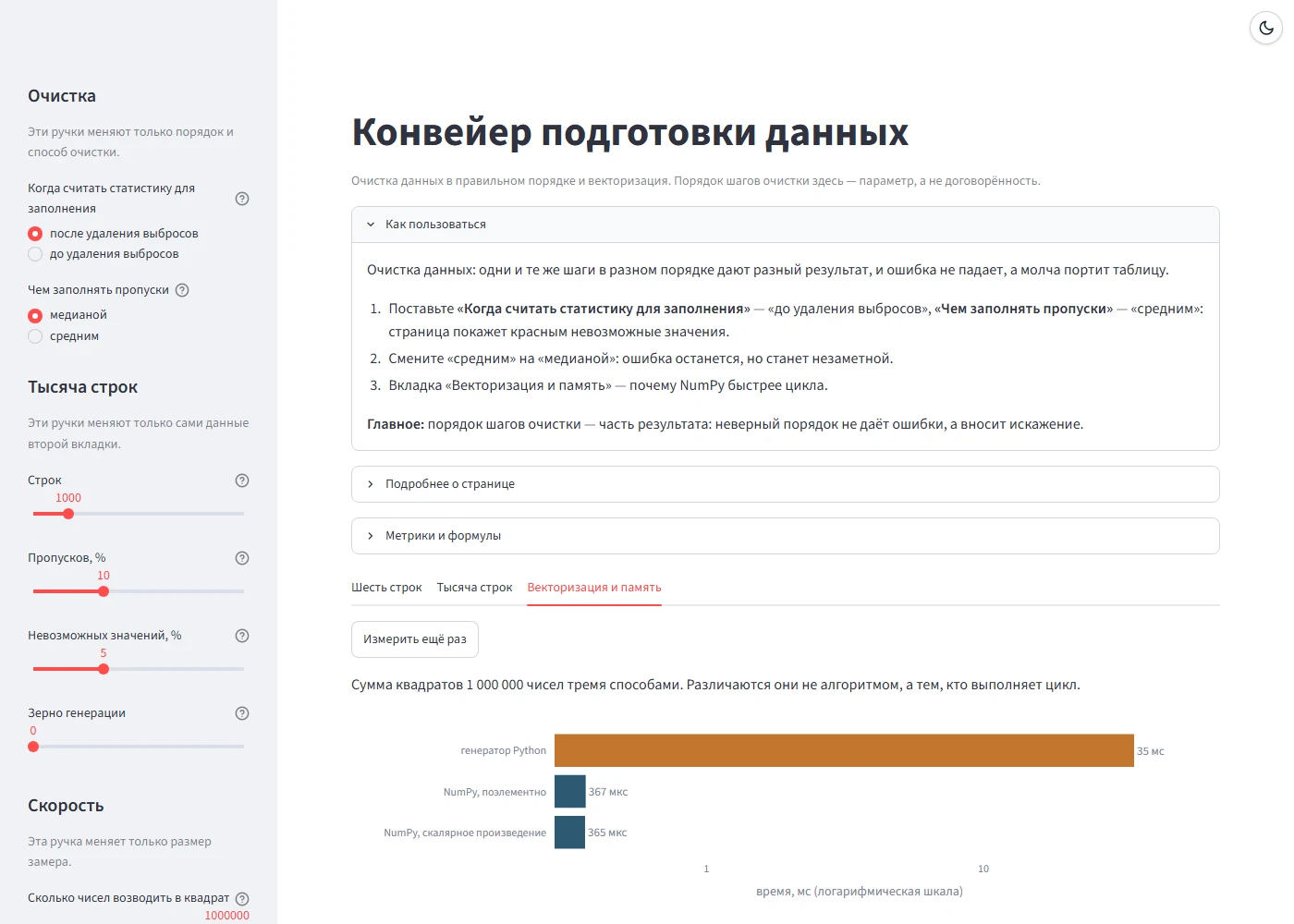
The cause is the clock. So that timing attacks cannot read memory, browsers coarsen performance.now(), and through it the time Python sees: to 0.1 ms in Chrome and to 1 ms in Firefox and Safari. A NumPy sum of ten thousand squares fits within one tick of that clock, and timing a single call gave zero. Now, as in timeit, each measurement is a batch of calls lasting at least 20 ms: twenty ticks of the coarsest clock keep the rounding within 5 %. The number of calls is chosen from the series 1, 2, 5, 10, 20, 50…, and the time is shown in µs, ms or s.
Conclusions
- The theme of an application that watches
prefers-color-schemeby itself can be switched by replacing the answer to that query — without a restart and without touching the application’s code. - An explanation on a chart is also a check: highlighting the real features at once exposed a mistake in text written without it.
- Conclusions in explanations are better computed from the data than written in: then they cannot drift from the chart at another setting.
- Timing in a browser has to allow for a coarsened clock: a batch of calls instead of one.
Availability
The playgrounds open in a browser with nothing to install, and the source code is open.
- Playgrounds: konkin-nikita.ru/gd_learn/topics
- Source code: github.com/nikita-konkin/gd_learn
Tags
More project updates
ML Playgrounds: A Second Course, a Catalog by Topic and Numbers That Depend on the Library Version
The playgrounds of a master's machine learning course have been joined by six playgrounds of a bachelor's course on programming AI systems in Python, and the site has become one...
Seven Playgrounds for a Machine Learning Course: Labs You Can Turn the Knobs of in a Browser
A gradient-descent trainer grew into a set of interactive apps for the Machine Learning Fundamentals course of a linguistics master's programme. Each one repeats a lab or a lect...