Seven Playgrounds for a Machine Learning Course: Labs You Can Turn the Knobs of in a Browser
A gradient-descent trainer grew into a set of interactive apps for the Machine Learning Fundamentals course of a linguistics master's programme. Each one repeats a lab or a lecture block on the same corpus, reproduces its numbers — with tests checking that on every run — and runs entirely in the browser, with no server.
The project started as a gradient-descent trainer: synthetic data, three kinds of descent, an animation of the steps and the loss surface. In a week and a half it grew into a set of seven interactive apps. The six new ones were made for the Machine Learning Fundamentals course of a linguistics master’s programme: each repeats a lab or a lecture block, and all of them work on the same corpus — 160 localisation segments of a software interface, in Russian.
A lab in a notebook shows a result. A playground lets you turn it: change the features, a threshold or the model’s order, and see at once what happened to the numbers.
Numbers that match the lab
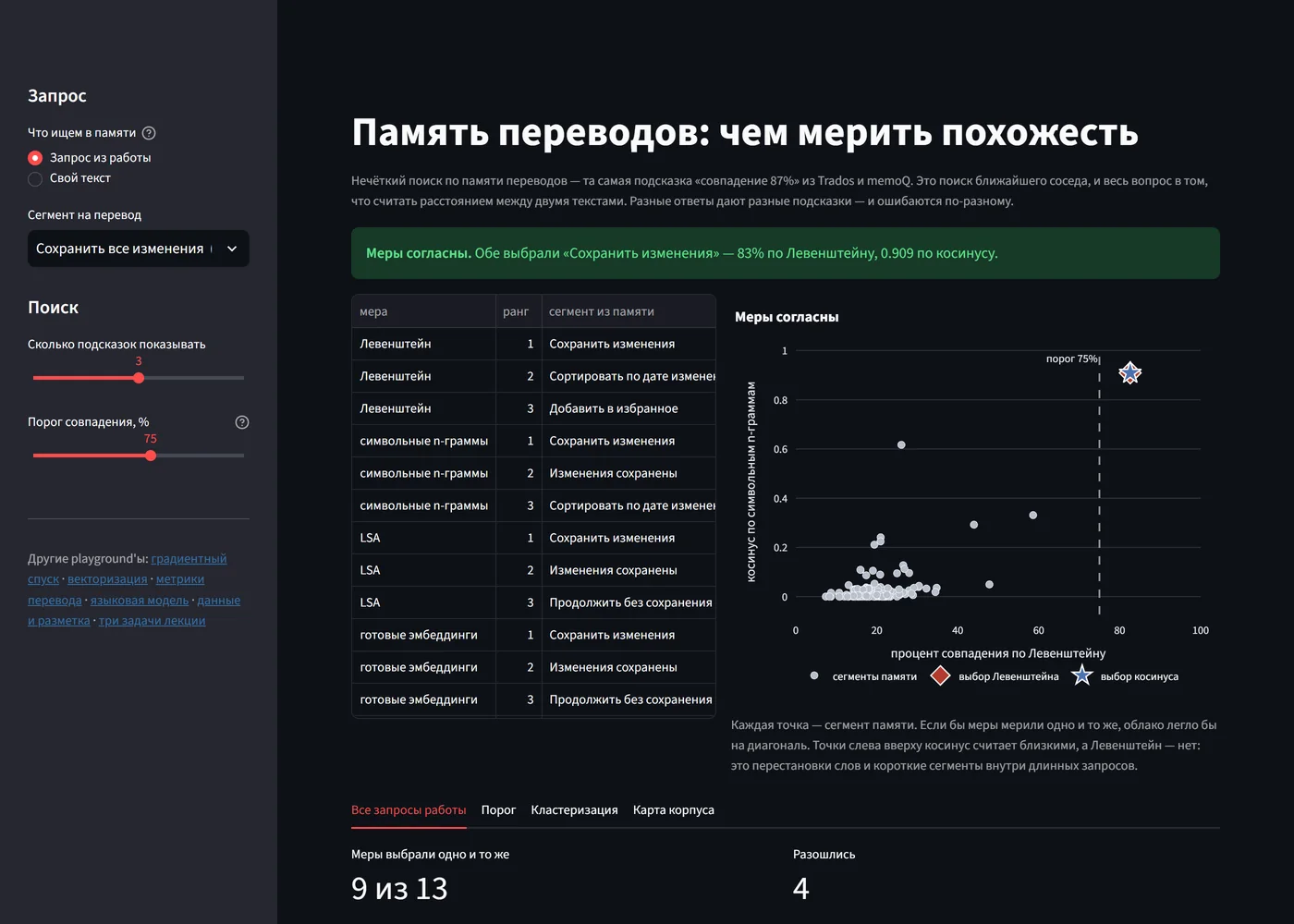
The one requirement on every playground is that it reproduces its lab’s numbers. Otherwise a student sees one thing in the app and another in the notebook, and trust in both is gone. So agreement is not claimed but checked, by tests on every CI run: the corpus’s mean BLEU of 0.458 against 0.46 in the lab, the feature comparison table to the third decimal, and nine of thirteen translation memory queries on which the measures picked the same segment — as in the lab.
Even the rounding had to match. Naive Bayes on character n-grams gives exactly 98/160 = 0.6125. The notebook prints 0.612, because it rounds half to even; a format string would print 0.613. Every playground rounds the way the notebooks do — otherwise a student would see a difference in the last digit and rightly ask which number is correct.
Reproducing the numbers also checked the course materials themselves. One of them gives 0.024 for a clustering score and a growth of “about seven times”, while the notebook, when run, prints 0.079 — a growth of 2.2 times. The playground reproduces the notebook.
What a metric cannot see
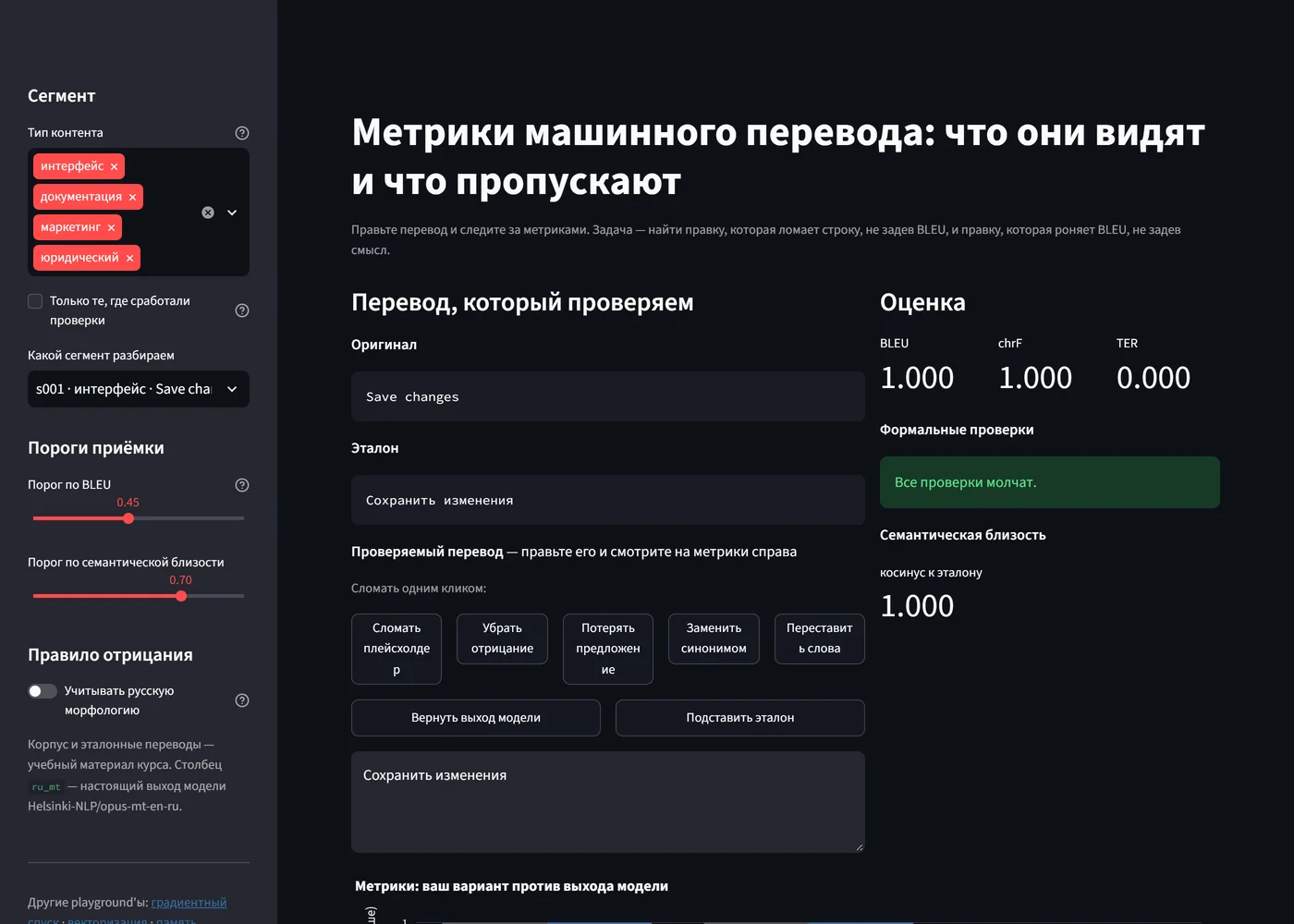
The translation metrics playground is built around two edits the student has to find. The first breaks the string without touching the metric: insert the reference into a segment and damage a placeholder, {name} → (name}, and BLEU stays at 1.000. Tokenisation drops punctuation, so the metric cannot see this breakage at all, while the interface string will no longer compile. The second edit is the reverse: replacing a word with a synonym cuts BLEU by 0.4 with the meaning fully intact.
Reproduction also found a blind spot in the check itself. The lab’s negation rule lists word forms, and on this corpus it raises two false alarms: «Невозможно подключиться» (the negation is fused to the stem) and «Результаты отсутствуют» (only the form «отсутствует» is listed). A sidebar toggle swaps in a morphology-aware rule: the alarms drop from eight to six, while the one real dropped sentence is still caught. The lab’s rule stays the default so its numbers reproduce — and the conclusion for the report comes ready-made: the remedy for a metric’s blind spot has a blind spot of its own.
Quality and copying are the same axis
The lab’s language model demonstration needed TensorFlow, a GPU and Colab, and trained on English Shakespeare — the only lab that left the shared corpus. It was replaced by a character n-gram model that trains in the browser on the same Russian corpus in milliseconds. The model is a dictionary of counts; it can be printed and read by eye.
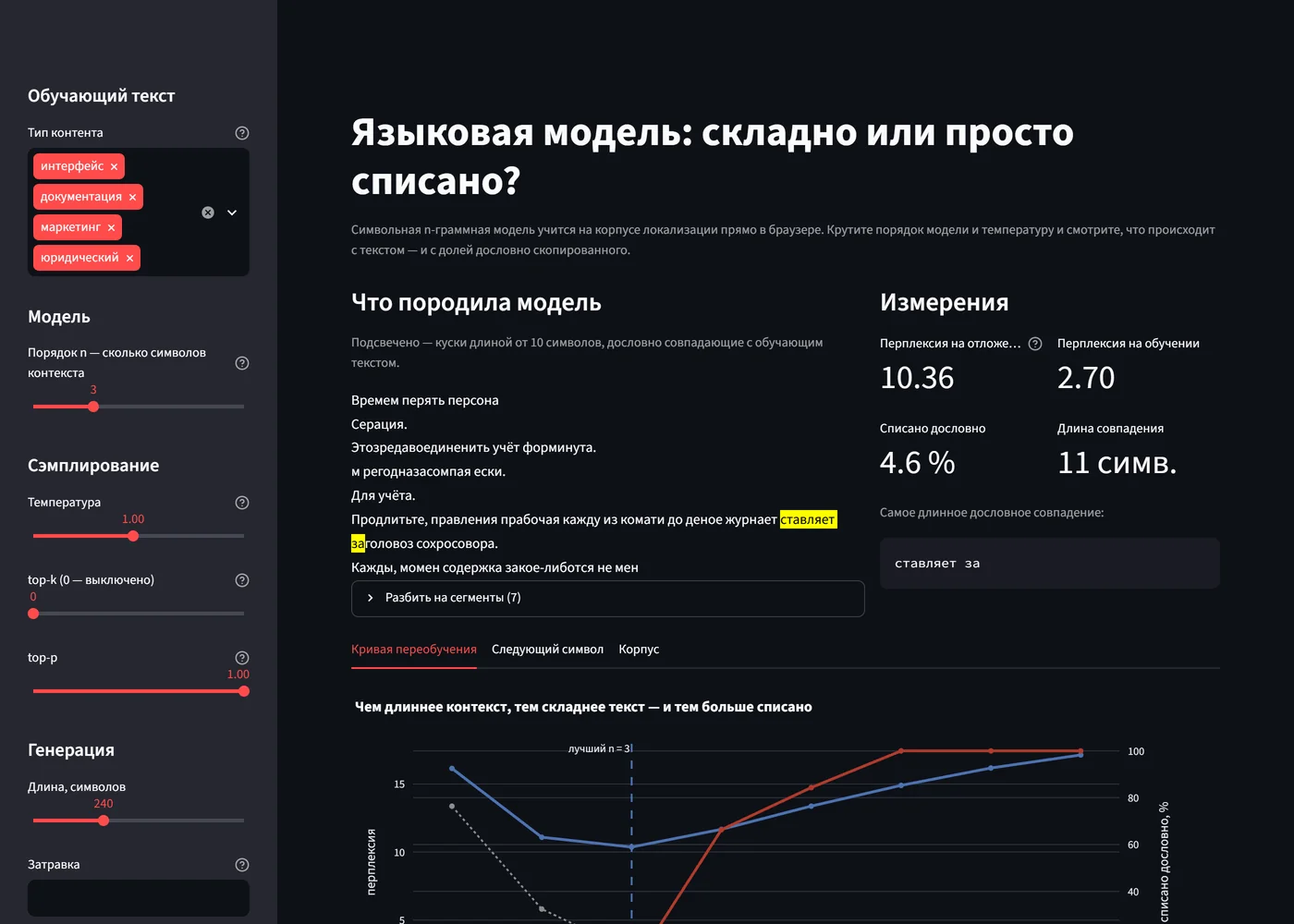
It is there for the sake of one pattern. The model-order slider changes three quantities at once:
| order n | held-out perplexity | copied verbatim |
|---|---|---|
| 1 | 16.14 | 0.0 % |
| 3 | 10.36 — the minimum | 3.7 % |
| 5 | 13.37 | 93.7 % |
| 8 | 17.13 | 100.0 % |
At n = 1 the text is original and meaningless. At n = 8 it reads like real documentation — and is highlighted in full, because it consists of verbatim pieces of the corpus. Held-out perplexity turns back up after n = 3: the model stops generalising and starts memorising exactly where the text starts to look respectable. The conclusion need not be taken on trust — matches of ten characters or more are highlighted right in the generated text.
One detail was found only in the browser: the seed slider at first controlled both the train/held-out split and the sampling. Changing the seed to see a different sample reshuffled the data and moved the overfitting curve. The split is now fixed, and a test checks that the measurements hold still while the text changes.
Features matter more than the model
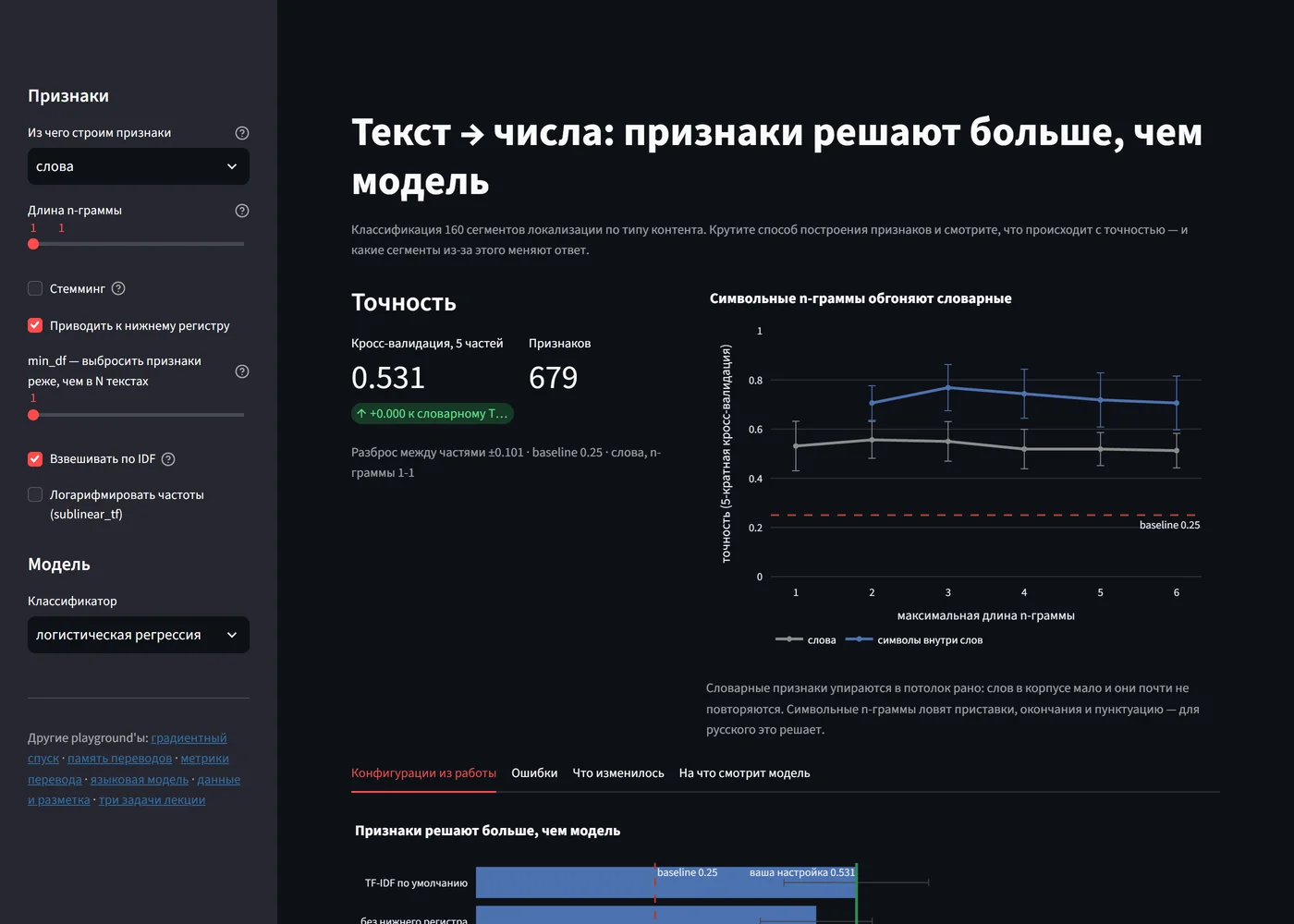
The vectorisation playground is an interactive version of the first lab: classifying segments by content type. Its main chart shows accuracy as a function of n-gram length. Word features hit a ceiling around 0.55 — the corpus has few words and they barely repeat. Character features climb above 0.74 because they catch prefixes, endings and punctuation; for Russian this matters more than changing the classifier.
The “What changed” tab shows what the average accuracy hides: when the features change, some segments get fixed and others get broken, and they are different segments. And if the spread between cross-validation folds is larger than the difference from the reference setting, the interface warns on its own: on 160 segments such a difference cannot be passed off as an improvement.
Where similarity measures disagree
The translation memory playground compares four similarity measures — Levenshtein distance, character n-grams, LSA and ready-made embeddings — on one query. Its main chart places every segment on a plane of Levenshtein percentage against cosine. If the measures measured the same thing, the cloud would lie on the diagonal; instead, each measure’s choice ends up in its own corner. The disagreements are of three kinds: reordered words, a short segment inside a long query, and nominalisation, where both suggestions are reasonable and a human has to choose.
Irreproducibility is dealt with honestly here too. KMeans clustering reaches a different local minimum on a different BLAS implementation, and the spread across initialisations is wider than the difference between representations. So the tests check the lab’s claims — agreement between clusters and content types is close to zero, embeddings shift it but do not solve the task — rather than a third decimal that cannot be carried from machine to machine.
Data and annotation
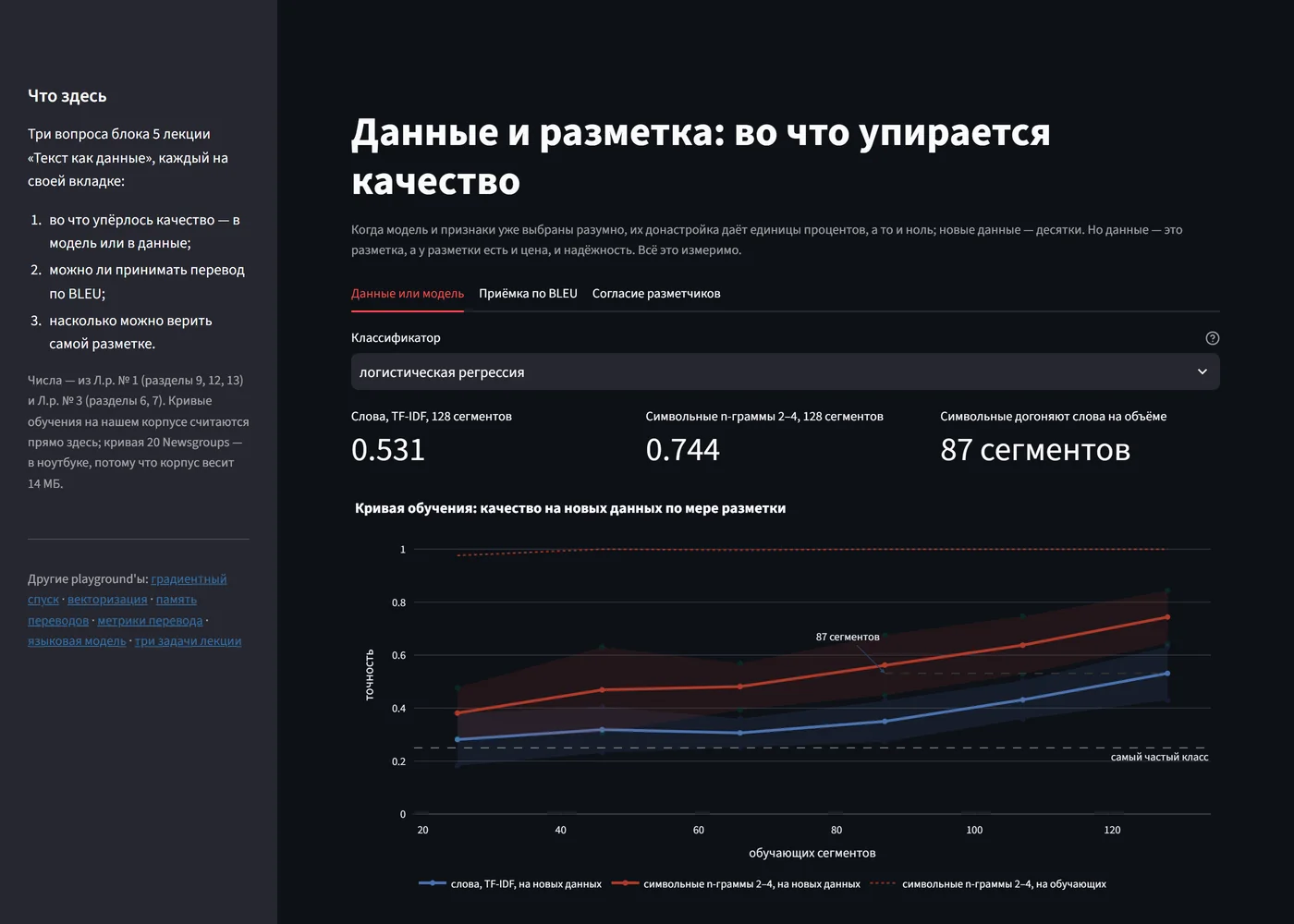
The sixth playground asks questions about the data itself. Character n-grams trained on 87 segments catch up with words trained on all 128: a good idea about features saves 41 segments of annotation. There is no BLEU threshold at which accepting translations unchecked makes no mistakes: a segment with a critical error scores 0.630, a flawless one 0.156. And two annotators who do not agree at all still match in 65% of cases when 80% of segments are error-free — which is why agreement is measured with kappa, which subtracts such matches.
The instructor’s answer key for error annotation is not given to students, and the playground does not publish it: the tabs use only the ten segments the lab annotates itself, and a test checks that the data folder holds exactly four known files.
Three tasks from the introductory lecture
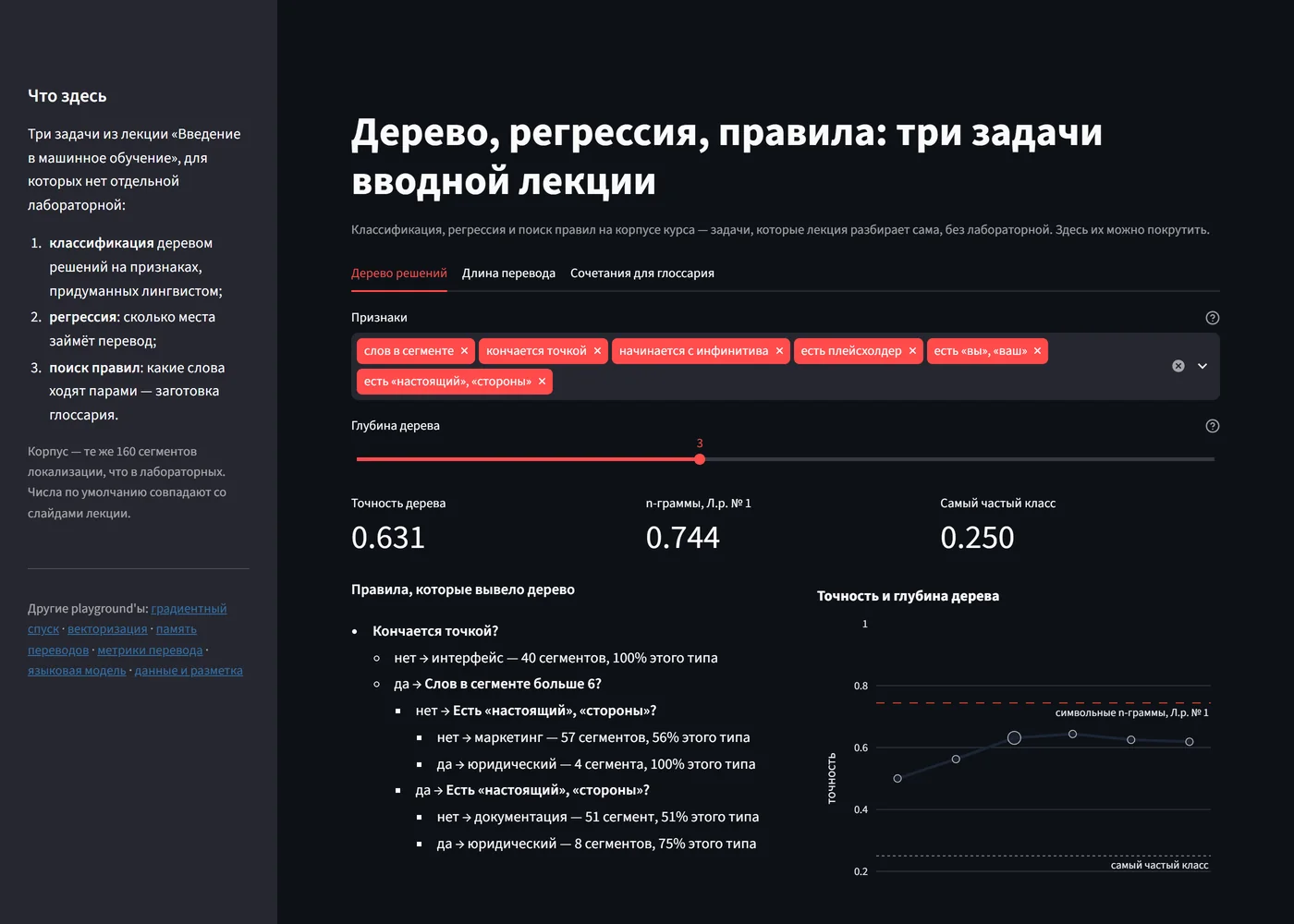
The last playground brings to life tasks that appear on the introductory lecture’s slides as a single picture. A depth-3 decision tree on six features a linguist would come up with scores 0.631 against 0.744 for character n-grams: the rules are readable but lose. Without the “ends with a full stop” feature, accuracy falls to 0.506. A regression of translation length shows that the slide’s “+10%” is the mean of per-segment ratios, while by total characters the translation is only 6.6% longer.
This is where an error invisible to the eye turned up. Under pandas 3, strings are stored in pyarrow, and the word boundary \b in its regular expressions knows only Latin letters: next to Cyrillic it is never found, and two of the six features silently become zero. So the features are computed with the re module, and a test guards the spot.
Python without a server
GitHub Pages serves only static files, while Streamlit normally needs a Python server. So the site is built with stlite: CPython (Pyodide) and Streamlit run right in the browser through WebAssembly, and all computation happens on the student’s side. The sources are copied into the build unchanged, so the deployed app cannot drift from the repository.
The browser’s price is limitations that have to be worked around. The real pyarrow does not fit in the build, and stlite substitutes a stub that lacks some classes. scikit-learn touches them while parsing any input, so without a patch any call to it would fail in the browser. The patch adds the missing names as empty classes that never have instances, so isinstance honestly returns False. The multilingual encoder for semantic similarity does not fit in the browser either — so that measure is precomputed for the original texts, and for hand-edited text the interface says plainly that it is unavailable.
Conclusions
- An interactive version of a lab is useful only if it reproduces the lab’s numbers. The agreement is worth checking with tests, down to the rounding rule.
- Reproduction also checks the source materials: it found a discrepancy in the course documentation and false alarms in a lab’s rule.
- The best argument is a visible one. Highlighted verbatim copying convinces of overfitting more reliably than any curve.
- If a number does not reproduce across machines, check the claim, not the number.
- Static hosting removes the server but moves the limitations into the browser: they have to be known by name and closed with tests.
Availability
All seven apps are open and run in the browser with nothing to install. The first load takes up to half a minute while the browser loads Python itself; after that everything is computed in place, with no calls to a server. The source is on GitHub and GitFlic.
- Playgrounds: konkin-nikita.ru/gd_learn
- Source: github.com/nikita-konkin/gd_learn
Tags
More project updates
ML Playgrounds: A Dark Theme for Streamlit Without a Restart, and a Mistake the Highlighting Found
A theme switch on every page of the site that repaints the Streamlit playgrounds without restarting Python; an explanation of the data on the data-leakage playground, where high...
ML Playgrounds: A Second Course, a Catalog by Topic and Numbers That Depend on the Library Version
The playgrounds of a master's machine learning course have been joined by six playgrounds of a bachelor's course on programming AI systems in Python, and the site has become one...