Otkrytyi Diplom: From Grade Statement to Blank — Graduation, Documents, Printing and Blank Accounting
In a week the Otkrytyi Diplom prototype went the whole way of a graduation: matching a group's grade statement to the curriculum, a registry with registration numbers, corrections laid over the files, printing the diploma and supplement from the typographer's templates, and accounting for strict-control blanks with a registration book. How it works and how it was checked against documents CyberDiploma printed.
In the previous breakdown the curriculum became an entity of its own with editions, and the graduation was named as the next stage. In a week, from 2 to 6 October, the prototype went the whole way: from a group’s files — the grade statement and the student information — to a printed blank and an entry in the registration book. Each step is described in a decision record of its own, ADR 0009 to 0013, and there are now 259 tests instead of 128.
All screenshots below were taken on a made-up group from the project’s test data.
Graduation: matching instead of heuristics
A graduation starts from two files of a group — the grade statement from the faculty office and the student information. The form of study and the admission year are read from the statement’s header: the admission year is the academic year of the first session minus the course number less one. They select the edition of the curriculum.
Then the statement is matched to the plan in the staging area. Students are matched by “Surname I. P.”, subjects by a chain of rules: the link remembered for this programme, then the same printed name, then the only containing name, then a proposal to be confirmed, and finally the operator’s choice. Candidates are filtered by the credits computed from the hours and by whether there is a course work. Name comparison takes the faculty office’s habits into account: the suffix “(Elective disciplines …)” on a chosen elective, a practice written as “Kind. Type” instead of “Kind (type)”, double spaces, punctuation and the letter «ё». While any row is still open, nothing is confirmed.
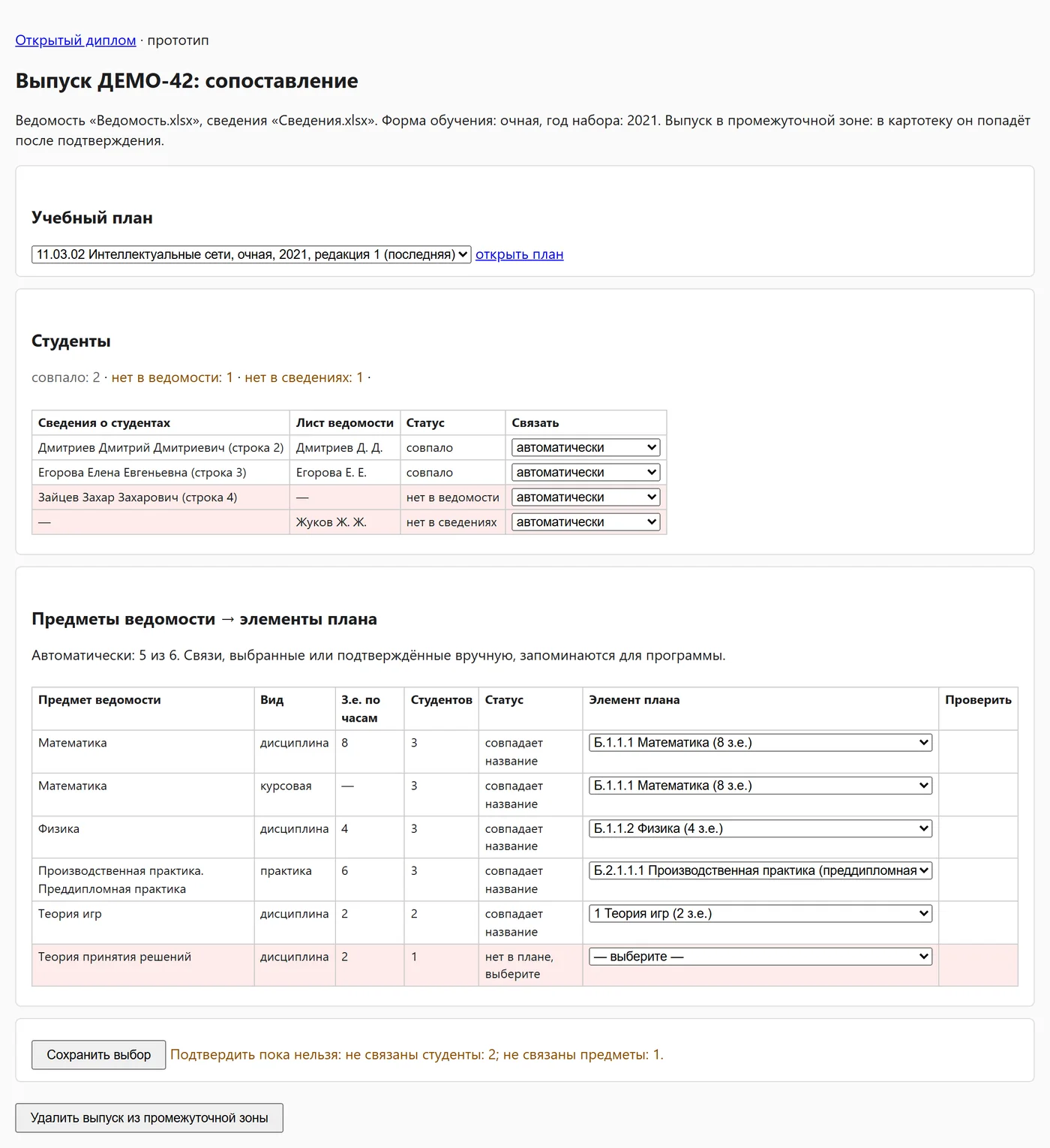
A statement often arrives before every grade is in, and the group is loaded again. So the operator’s choice about a student is tied to the name rather than the row number and carries over to the next loading of the same group. Loading the same group again goes through without a single question to the operator.
On real files (the check ran locally; no data left the machine) a part-time group of 2026 matched fully automatically: 14 students of 14 and 56 subjects of 56. Three groups of 2025 did too: 58, 47 and 26 subjects without a single manual choice.
Once confirmed, graduates and their results go to the registry. Checks run at three levels — error, “not completed” and warning — and the XML for CyberDiploma is now built from the registry, with the programme fields taken from the plan.
A graduate’s document
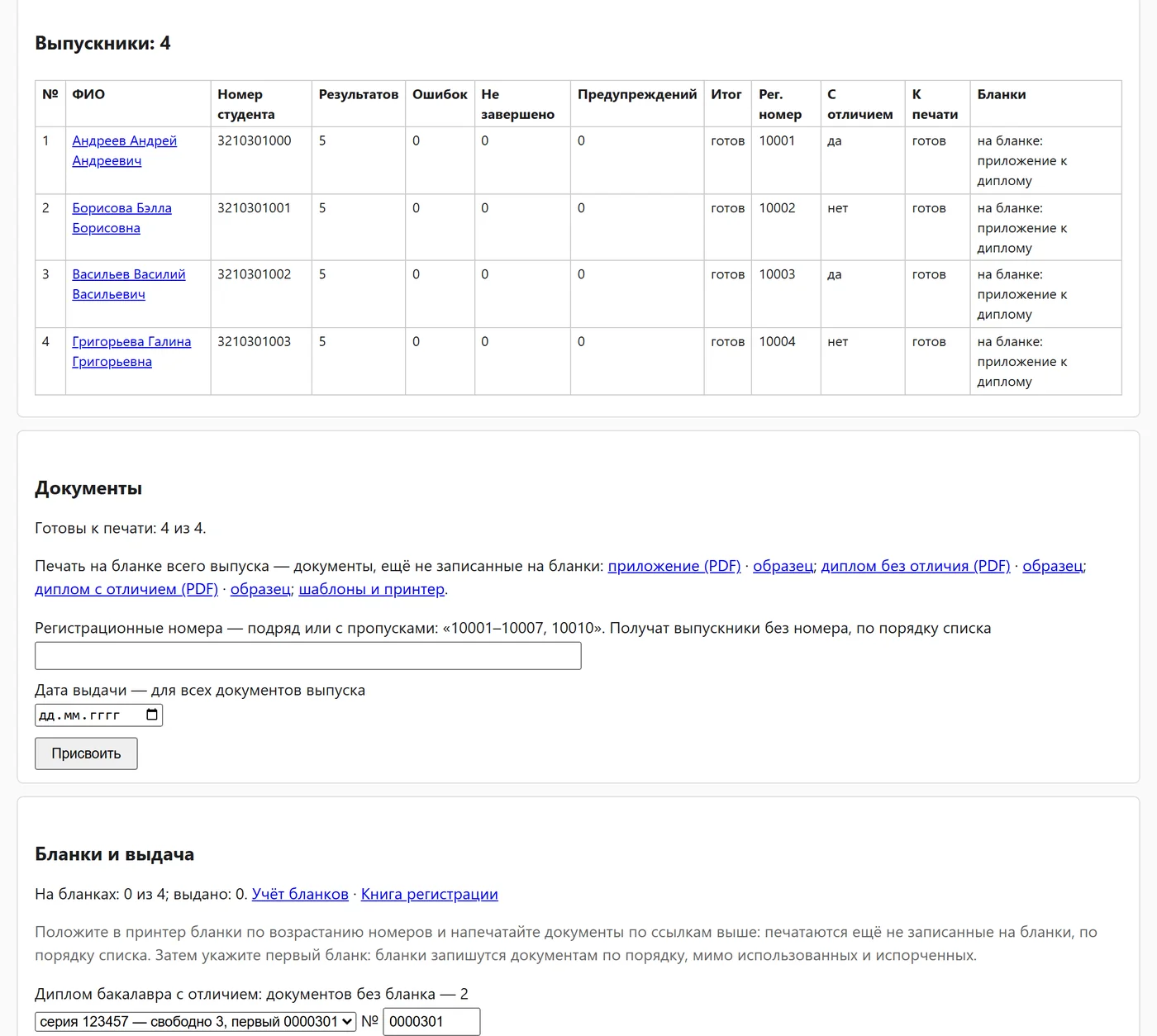
A diploma and its supplement share one registration number and one date of issue — as Order No 670 requires — and the number is unique across the registry. Numbers are given as a list, in a row or with gaps, for example “10001–10007, 10010”, and handed out in order to those who do not have one yet. Extra and missing numbers are shown, and a number already taken rejects the whole list. A duplicate has a number of its own.
“With honours” is reckoned by item 27 of the order over all grades, facultatives included — as the process owner decided. The program shows the number of “excellent” grades, the percentage and the average, and the operator decides. On 31 printed supplements of 2023 and 2026, the reckoning matched the “with honours” mark in 30. The one difference is exactly 75% “excellent”, printed without honours: precisely the borderline case left to the operator.
Corrections laid over the files
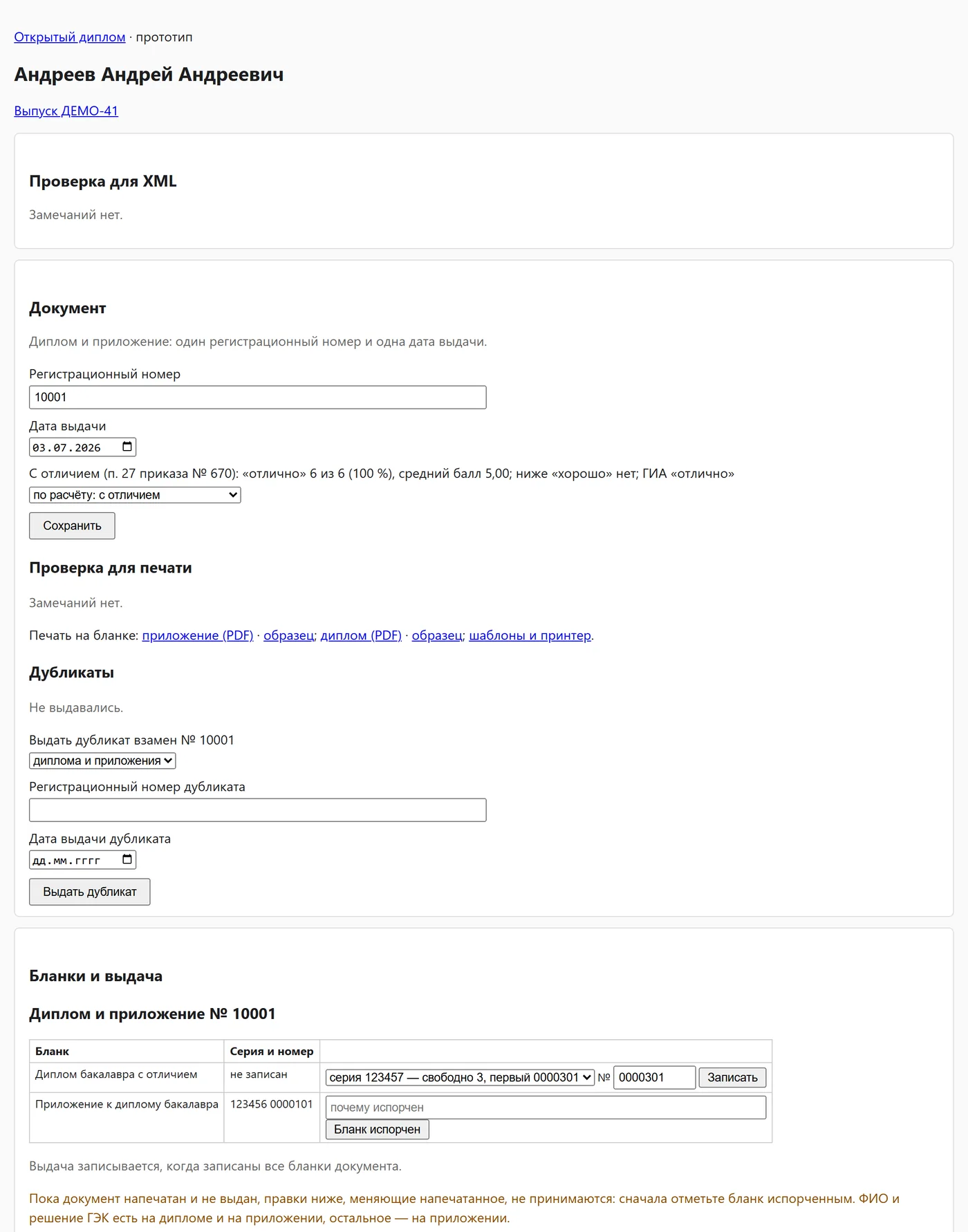
Not everything a document needs is in a group’s files: the information file may lack the state exam grade, the statement the grade for the pre-graduation practice. Until now the operator typed such things into CyberDiploma after exporting the XML. Now a graduate’s card is a correction form: name, date of birth, previous education, the date and protocol of the examination board, the state exam, the thesis topic and grade, and for each result the grade, the credits and the kind. A grade for a plan element that is missing from the statement adds the result with the name, kind and credits from the plan.
A correction is stored apart from what the files gave and laid over it when the graduation is read, so the checks, the XML, the honours reckoning and printing all see it. Loading again does not lose it: the graduate is found by name, the corrected name included. If the file has changed since, the correction stays and the check shows a warning. A value set back to what the files say removes the correction, and every correction goes into the graduation’s journal.
Printing from the typographer’s templates
Diploma blanks come from the typographer together with FastReport templates in .fr3 format, from which CyberDiploma prints them. Otkrytyi Diplom does not draw a layout of its own but prints from the same templates. The operator uploads the template of each document and level of education, and the template is stored in the database as it is, not in the repository.
The template is read into millimetres and laid out the way FastReport lays it out: row heights in whole pixels, line breaks by the field’s width in whole pixels, credits and grade on the last line of a name, as CyberDiploma’s template script does, and columns where the page puts them. CyberDiploma’s data sets are filled from the registry in the order of the 2026 supplements. A document prints only when its check for printing is clean. A sample marked «ОБРАЗЕЦ» (sample) always prints and ends with a page of remarks.
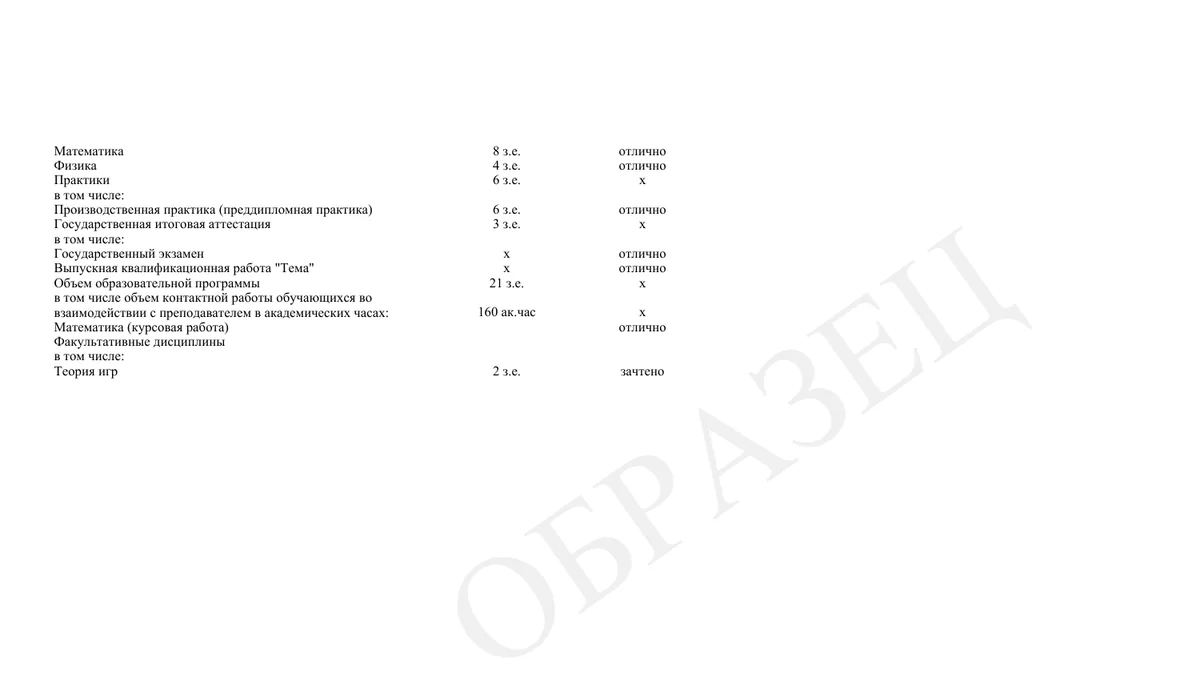
The main check of the layout is against what has already been printed. The supplements CyberDiploma printed in 2026 from the 2025 template — 83 graduates of seven groups, full-time and part-time, bachelor’s and master’s — were laid out again. 76 matched completely: every line breaks in the same place, the baseline deviates by no more than 0.16 mm, and the whole page is shifted horizontally by 0.15 mm. In the other seven, the thesis topic contains a line break inside the data, and CyberDiploma breaks the line mid-text. The comparison tool prints only numbers: printed supplements contain personal data.
The printing tests were again checked by breaking the code. Of fourteen planted errors, the tests caught thirteen at once. The fourteenth — course works vanishing from the table when the template has no band of its own for them — went unnoticed, and the HTTP test was extended to catch it too.
Strict-control blanks
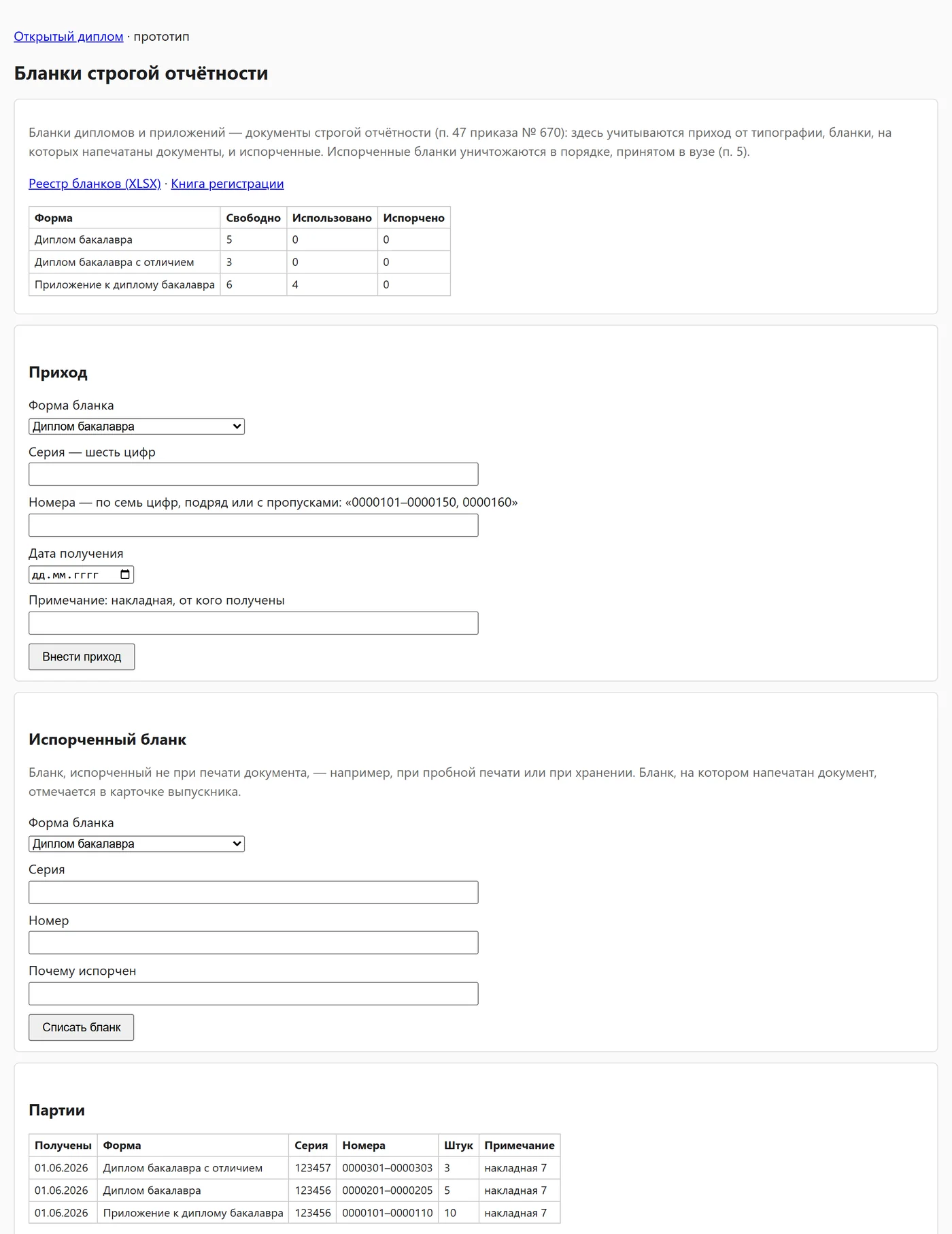
A diploma blank is a strict-control document, and its path has to be accounted for. Blanks arrive in batches: a form, a six-digit series, seven-digit numbers in a row or with gaps, a date and a waybill. A blank already accounted for is not accepted a second time.
After a run is printed, the operator gives the first blank, and free blanks are recorded to the documents in order, skipping used and spoiled ones. If there are not enough blanks, nothing is recorded — there is no partial recording. A spoiled blank keeps its reason and frees the document.
The most important rule is that what is printed does not change silently. While a document is on a blank and not handed over, reprinting, changing the number and date, corrections that change what is printed and reloading the group’s files are refused — the blank must be marked spoiled first. A handed-over document never changes: an error in it is corrected with a duplicate.
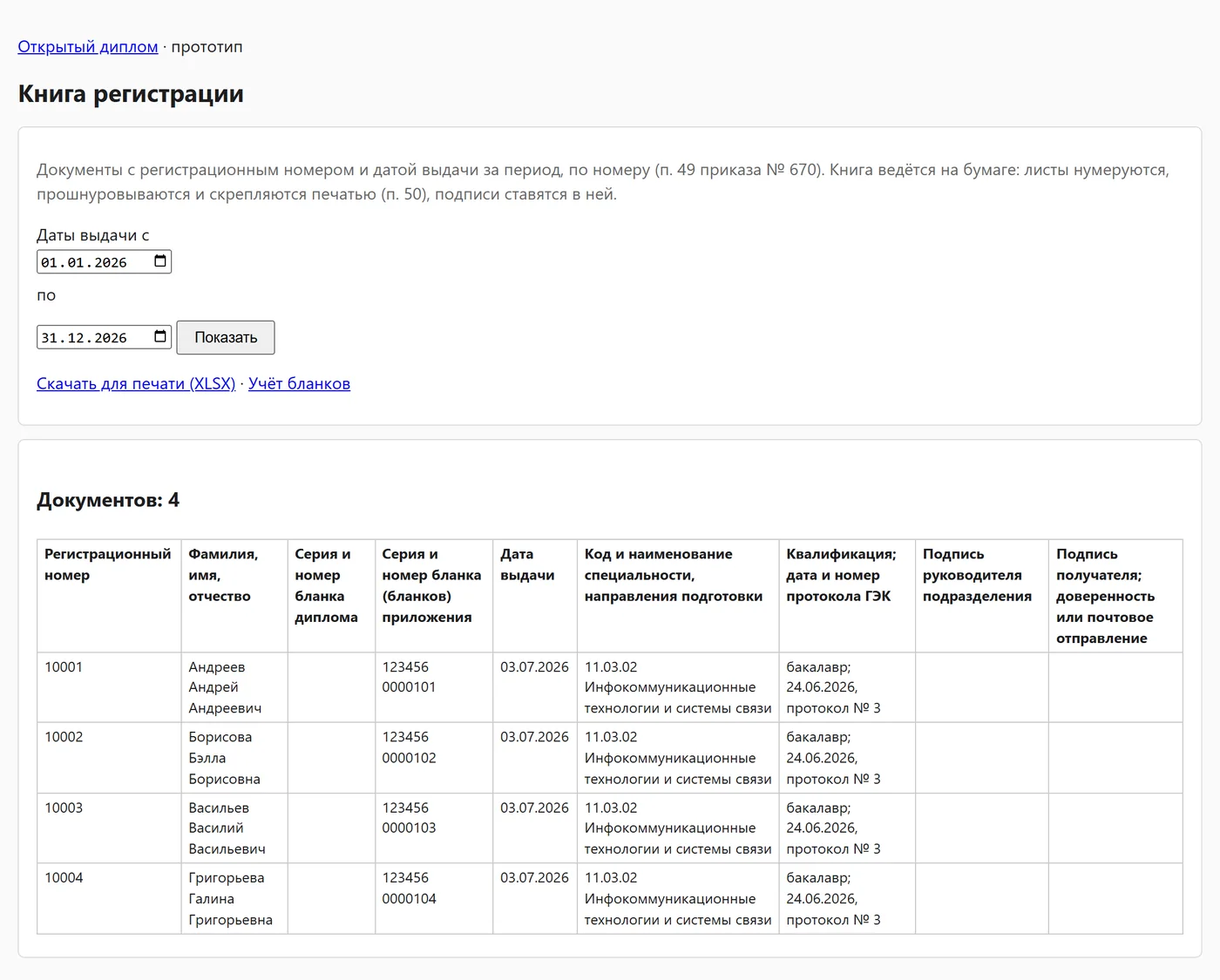
The registration book lists the columns of item 49 of the order over a period — as a page and as an XLSX file to print on A4 landscape, with a header on every sheet and numbered sheets. The register of blanks exports the same way.
Along the way the distribution got lighter: the SQLite native libraries for FreeBSD, musl and less common architectures were dropped, keeping Windows and Linux on x86, x86-64 and aarch64. The program file shrank from 39.6 to 31.4 MB.
Next
The prototype now goes the whole way, but the layout has not yet been checked on paper: the test sheet and a sample supplement need to be printed on the printer that prints the blanks, and the deviation measured. Then comes a trial graduation in parallel with CyberDiploma. Some decisions on blank accounting — the forms of supplements, the procedure for spoiling and destruction, the layout of the registration book — are recorded as assumptions awaiting the process owner’s confirmation. And the blank’s series and number in the registry open the way to exporting to the federal register of education documents (FIS FRDO).
Conclusions
- Matching with operator confirmation and remembered decisions replaces heuristics: a group loaded again asks not a single question.
- Corrections are worth storing over the source data rather than instead of it: then it is visible what came from the files and what was corrected, and a changed file does not silently overwrite a correction.
- Someone else’s template format is better read than replaced with one’s own: printing from the typographer’s templates is checked against already printed documents to hundredths of a millimetre.
- A check against real documents can be done without disclosing them: the tool outputs only numbers.
- Blank accounting is above all a set of prohibitions: what is printed does not change silently, and what is handed over does not change at all.
Availability
The project is open under the Apache 2.0 licence. The decisions are in docs/architecture/adr/0009–0013, the results of the checks in docs/prototype.md.
- Source code: github.com/nikita-konkin/open-diplom
Tags
More project updates
Otkrytyi Diplom: Curricula by Admission Year and Edition
In Otkrytyi Diplom the curriculum has become an entity of its own: plans are stored by programme, form of study and admission year, every correction is saved as a new edition, c...
Otkrytyi Diplom: A Java 11 Prototype, Checked Until the XML Matched Byte for Byte
The draft architecture for an open replacement for CyberDiploma now has a prototype and a repository of its own. What the prototype does, which of the stack criteria are already...